Netz OÖ eService
The Netz OÖ eService integration reads the energy data of your electricity meter points from the Netz OÖ eService portal of Netz Oberösterreich, the grid operator in Upper Austria. It provides the meter readings, the monthly and yearly consumption trends, the peak power of the previous month and, if your meter point takes part in an energy community (Energiegemeinschaft), the energy shared with the community.
This is an unofficial community integration. It is not affiliated with or supported by Netz Oberösterreich GmbH. For support, open an issue, do not contact Netz Oberösterreich.
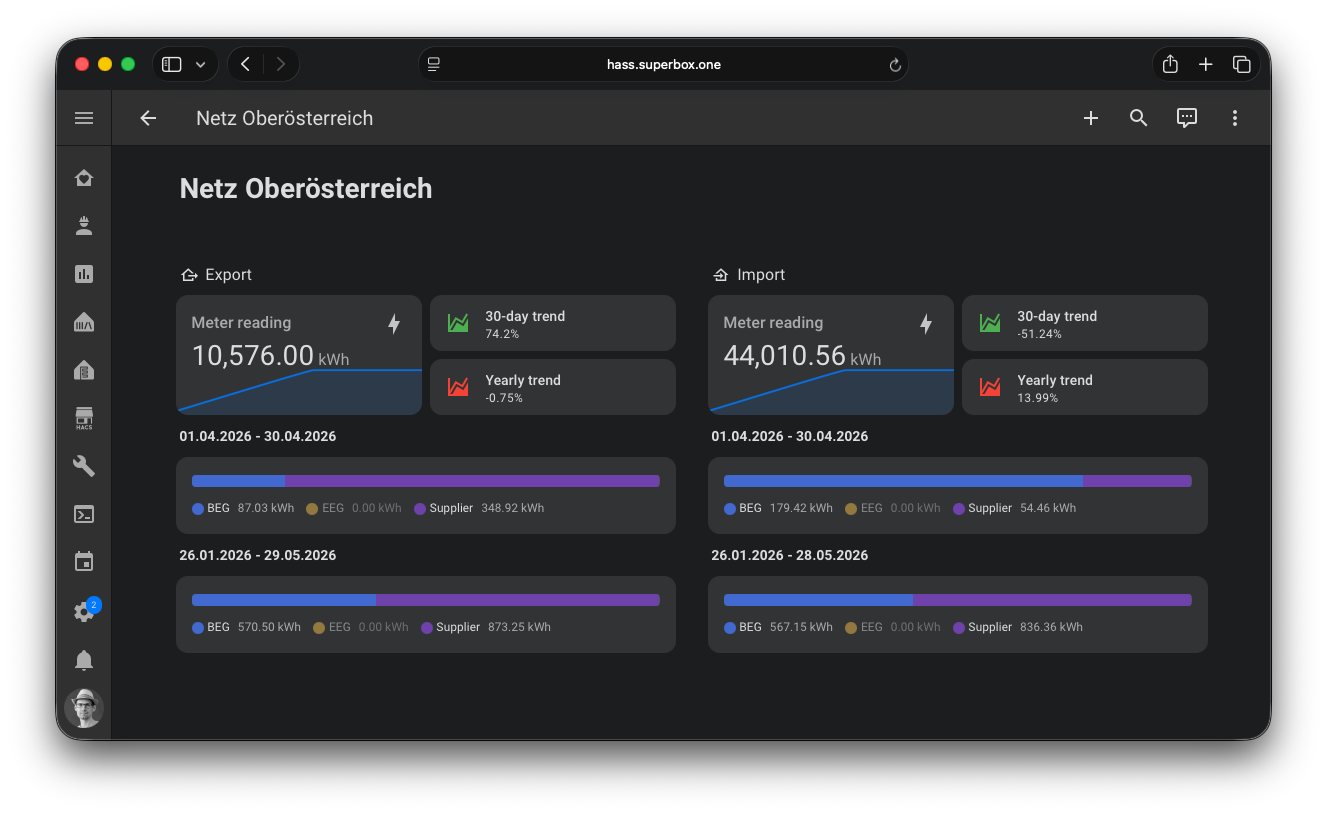
Use cases
- Show the meter reading and the consumption of the current and previous month or year on a dashboard.
- See how much of your consumption is covered by your energy community and how much still comes from your supplier.
- Track how much energy your photovoltaics system shares with the energy community.
- Get notified when the participation in an energy community changes, e.g. when it is revoked.
- Check the peak power of the previous month, e.g. to plan a heat pump or a wallbox.
Supported devices
The integration creates a device for each electricity meter point of your account:
- Household (Haushalt): meter point that imports energy from the grid
- Photovoltaics (Photovoltaik): meter point that exports energy to the grid
Each energy community that a meter point takes part in gets its own device, linked to the device of the meter point.
Prerequisites
- Home Assistant 2026.9.4 or newer with HACS installed.
- An account for the Netz OÖ eService portal. Log in once in the browser to make sure that your meter points are shown there.
Installation

- Install the integration with HACS (search for "Netz OÖ eService"). For a manual installation, copy the
custom_components/netzooe_eservicedirectory of the latest release into thecustom_componentsdirectory of your Home Assistant configuration. - Restart Home Assistant.
Configuration
To add the Netz OÖ eService integration to your Home Assistant instance, use this My button:

Or go to Settings → Devices & services, select + Add integration and search for Netz OÖ eService.
| Parameter | Description |
|---|---|
| Username | The username of your Netz OÖ eService portal account, e.g. your email address. |
| Password | The password of your Netz OÖ eService portal account. |
To change the credentials later, select Reconfigure in the menu of the integration entry. If the portal rejects the credentials, e.g. after a password change, Home Assistant asks you to enter the new password.
Options
To change the options, go to Settings → Devices & services → Netz OÖ eService and select Configure.
| Option | Default | Description |
|---|---|---|
| Frequent updates (every 15 minutes) | Disabled | Refresh the energy community contribution factors and statuses every 15 minutes. When disabled, all data is refreshed every 3 hours only. |
| Show revoked energy communities | Disabled | Show revoked energy communities as separate devices and include their values in the total sensors. |
| Include data from inactive contract accounts (same meter point) | Enabled | Merge data from contract accounts with inactive suppliers at the same meter point into the data of the active or most recently ended contract. |
| Show inactive meter points | Disabled | Show meter points where all contract accounts are inactive, using the data of the most recently ended contract. |
Supported functionality
Sensors of a meter point
| Sensor | Description |
|---|---|
| Meter reading | Last meter reading in kWh |
| Maximum Import/Export Power (previous month) | Peak power of the previous month in kW |
| Monthly/Yearly trend (current/previous period) | Energy of the current and previous period in kWh |
| Monthly/Yearly trend | Change between the current and previous period in % |
| Supplier | Supplier name, market partner ID in id, contract start in contract_start |
| Type | Type of the meter point, e.g. "EEG 7ngem" |
| Profile data available until | Last day with profile data in the portal (diagnostic) |
| Energy community / Supplier import/export (total) | Total of all energy communities of the meter point (disabled by default, see below) |
The total sensors of the meter point are disabled by default. Enable them in the entity settings if your meter point takes part in several energy communities. They only include energy communities with the status "active", unless Show revoked energy communities is enabled.
Sensors of an energy community
| Sensor | Description |
|---|---|
| Energy community import/export L1/L2/L3 | Energy shared with the energy community, including the most recent L3 data |
| Energy community import/export L1/L2 | Energy shared with the energy community, final values (16-day delay) |
| Energy community import/export L2 (prev. month) | Energy shared with the energy community in the previous month |
| Supplier import/export L1/L2/L3, L1/L2, L2 | Energy imported from or exported to the energy supplier for the same ranges |
| Contribution factor | Contribution factor (Teilnahmefaktor) of the meter point in % |
| Status | Participation status, e.g. active or revoked, start date in valid_from |
The energy community and supplier sensors count the energy since the start of the participation. The
timeline attribute lists the time ranges of the profile data and is not recorded in the database.
Examples
The entity IDs start with sensor.netzooe_eservice_ followed by the meter point number, the energy community ID for
the sensors of an energy community, and the sensor key. Replace the ID in the example with the one of your
device, you find it in the entity settings.
Notification when a participation ends
This automation sends a notification when the status of an energy community changes from active to another status, e.g. revoked:
automation:
  - alias: "Energy community participation changed"
    triggers:
      - trigger: state
        entity_id: sensor.netzooe_eservice_at0000000000000000000000000000001_cc100001_status
        from: "active"
    conditions:
      - condition: template
        value_template: "{{ trigger.to_state.state not in ['unknown', 'unavailable'] }}"
    actions:
      - action: notify.notify
        data:
          title: "Energy community"
          message: >
            The status of {{ device_attr(trigger.entity_id, 'name') }}
            is now {{ state_translated(trigger.entity_id) }}.
Data updates
The integration polls the portal every 3 hours and refreshes all data. With Frequent updates enabled, the contribution factors and statuses of the energy communities are additionally refreshed every 15 minutes. The requests of an update run in parallel, at most 4 at the same time.
New meter points and energy communities are added after an update, without restarting Home Assistant. Devices that are no longer returned by the portal are removed.
Known limitations
- The portal provides the L1/L2 values of the energy communities with a delay of about 16 days. Sensors with "16-day delay" in their name only contain these final values.
- The meter readings and trends are only updated by the portal once a day.
- If the portal is not available, the sensors keep their last values until the next successful update.
- The portal is not designed for automated access. The integration can stop working if Netz Oberösterreich changes the portal.
Troubleshooting
- Invalid authentication: check that you can log in to the eService portal with the same username and password.
- Failed to connect: the portal may be in maintenance. Home Assistant retries the setup automatically.
- Missing energy community: the energy community is only shown if the portal returns a consent for it. Revoked energy communities are hidden, unless Show revoked energy communities is enabled.
- Missing meter point: meter points without an active contract are hidden, unless Show inactive meter points is enabled.
If the problem persists, enable debug logging, reproduce the problem and open an issue with the log and the diagnostics of the integration. Credentials and customer numbers are removed from the diagnostics.
Removing the integration
This integration follows standard integration removal.
- Go to Settings → Devices & services and select Netz OÖ eService.
- Select the three dots ⋮ of the entry and select Delete.
- To remove the files as well, remove the integration in HACS and restart Home Assistant.



 @mh-superbox